Project: Google Code to Youtualfunds.com



I just finished part of my summer project. I now have a "private" fund called TRPL at http://trpl.youtualfunds.com/.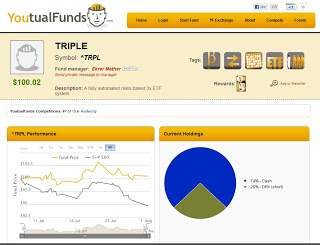 The system driving the fund resides on my Google Docs account. It is written in JavaScript. It triggers once a day so it takes up negligible resources. It pulls historical data from Google Finance, runs the proper algos and comes out with the proper fund allocation. It updates my fund at youtualfunds.com and emails me a confirmation of the new positions.Now I can go on vacation without worrying about my internet connection or possible power failure.
Youtualfunds.com is an online social investing site and a sister site to Collective2. It lets you trade a system online and possibly earn revenue by allowing subscribers to "buy" your fund at their broker. Even if no-one does, it's a great way to forward test a simple strategy. They do have a basic WebAPI entry interface. They do charge if you choose to take your Fund "public" (meaning others can subscribe to it).
I do manage a second fund at the site called "DGCP". It is far too complicated to code in Javascript. So my next project is to automate Amibroker to trade DGCP automatically.